
ShopMate
General e-commerce · Online
At a glance
Best for: general-store owners who want shoppers to search, compare and check out online without phoning in every order.
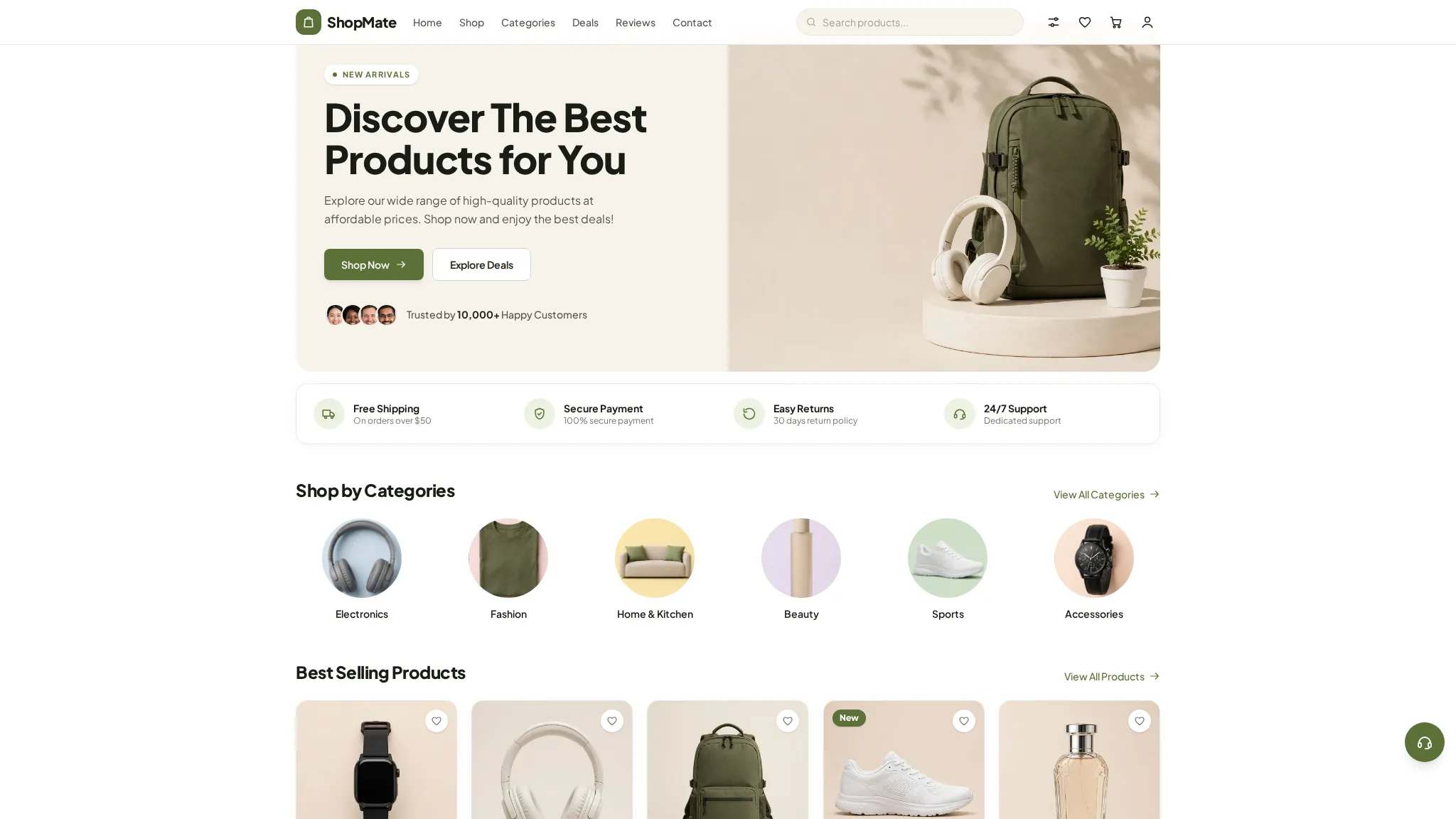
ShopMate is a general online shop demo: live search, category browsing, best sellers and deals, a cart and wishlist, and a full order flow from checkout to invoice and tracking. Shoppers can apply the WELCOME10 promo code and follow an order with its ID. Everything runs in the browser as a working demo — no real payment is taken and no parcel is shipped.
The problem
Demo scenario — a typical situation for this kind of business, not a real client's problem.
A typical general store problem: customers message or call to ask about stock and prices, because there is no catalogue to check; orders arrive as scattered chats, so prices and addresses get mixed up; and after a sale there is no invoice or tracking link to send. A website that lists products, takes the order and shows its status would end most of that back-and-forth. This is a demo scenario for this kind of business — ShopMate is not a real store and had no real customer problem to solve.
How we approached it
- 1 One shop for every category — search, deals, best sellers and the full order flow — instead of a separate page per department. A general-store shopper rarely knows the category first; they search for the item. Putting search, deals and checkout in one place means the journey from finding to paying never leaves the site.
- 2 The whole order journey in the demo — cart, checkout, invoice and tracking — with a clear demo note and no payment step. The point is to show the flow end to end, including the invoice and the tracking page a customer would actually receive. A real store would connect its own payment provider and courier.
- 3 A promo code (WELCOME10) and a wishlist with a header count, so the demo shows how a store nudges a first order. First orders are the hardest to win, and a small code plus a saved list are the two cheapest tools a small shop has. Both work in the demo, so a visitor can see the effect immediately.
What the demo includes
- Live search and category browsing
- Best sellers, new arrivals and deals pages
- Cart and wishlist with header count
- Checkout with WELCOME10 promo code
- Order confirmation, demo invoice and tracking
- Compare and gift cards
- Blog, help and contact pages
What you can try
- 1 Search for a product on /shop and open its product page
- 2 Add items to the cart and apply WELCOME10 at checkout
- 3 Complete the demo checkout and open the invoice it generates
- 4 Copy your order ID and paste it into /track-order to see its status
Limitations
- Demo data only — the products, prices and deals are illustrative, and the contact details (hello@shopmate.store, +1 (555) 123-4567) are placeholders
- No real orders, payments or deliveries are made — the invoice is labelled a demo invoice and no parcel is shipped
- The contact form states that no email is actually sent, so enquiries go nowhere at all
- No client results or metrics exist yet — this demo has never run a real store, so nothing about sales can be claimed
Your next step
Want an online shop like this? Order the Catalogue / Menu Website service and we will build it with your real products, prices and payment setup.
The project
A general multi-category online shop — live search, best sellers, deals, and a complete order flow from checkout to invoice and tracking.
The story
Shoppers can search and browse categories, add items to cart and wishlist, check out, and follow the order through invoice and tracking pages.
What we built
- Live search & category browsing
- Cart & wishlist with header count
- Checkout to invoice & tracking
- Deals, compare & gift cards
 View case study NaviX Technologies Family Dental Care Dental clinic · Austin
Contact us
Questions before ordering? Message us — we reply on WhatsApp.